How to Find Templates on Instagram: 3 Incredibly Simple Methods
Struggling with how to find templates on Instagram to make your content creation faster and more consistent? You’re not alone. Instagram templates are one of the platform’s best-kept secrets for building a beautiful feed, saving time, and boosting engagement. In this ultimate 2024 guide, you’ll discover three incredibly simple methods to find the perfect Instagram template for your brand, along with a step-by-step tutorial on exactly how to use templates on Instagram.
Table of Contents
Why Instagram Templates Are a Game-Changer for Your Strategy
Before we dive into the how, let’s quickly cover the why. Instagram templates are pre-designed layouts that you can customize with your own photos, videos, and text. Think of them as a digital stencil for your content.
Using an Instagram post template offers a multitude of benefits:
- Save Precious Time: No more starting from a blank canvas. A template gives you a head start, cutting design time from hours to minutes.
- Create a Cohesive Brand Aesthetic: Consistent use of fonts, colors, and layouts makes your profile look professional and instantly recognizable.
- Boost Engagement: Well-designed templates for carousels, stories, and Reels can dramatically increase shares, saves, and comments by making your content more visually appealing and easy to digest.
- Simplify Your Workflow: They are perfect for creating series, promotional announcements, or quote graphics without needing a full-time designer.
Whether you’re a small business owner, a creator, or just someone looking to spice up their feed, mastering how to find templates on Instagram is a non-negotiable skill. Let’s get started.
Method 1: Using Instagram’s Native Template Gallery (The Built-in Solution)
The easiest and most direct method is to use the template feature built directly into the Instagram app. This is primarily for Reels templates, which are fantastic for creating trending audio formats quickly.
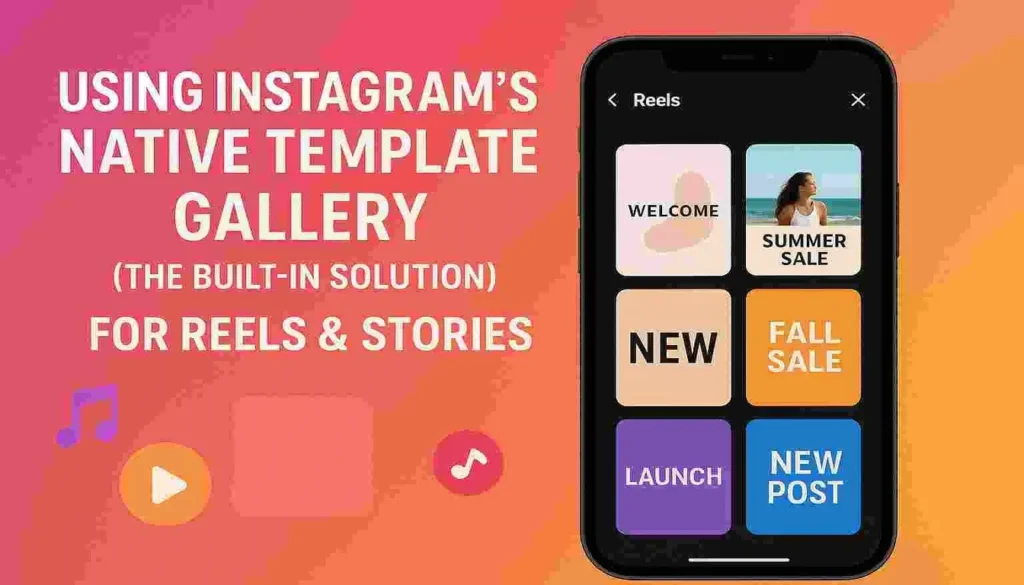
Step-by-Step: How to Find Reels Templates on Instagram
- Open the Reels Camera: Tap the
+icon in the top right of your home screen and select “Reel,” or swipe right from your feed to open the camera. - Access the Templates Gallery: On the left-hand side of the Reel recording screen, you will see a row of icons. Tap the one that says “Templates.”
- Browse and Select: You’ll now see a gallery of popular Reels templates. Each one shows the structure of the video (number of clips, timing, and audio). You can browse trending ones or use the search bar at the top to find templates for specific sounds or themes (e.g., “recipe,” “workout”).
- Use the Template: Tap on a template to preview it. When you’re ready, tap “Use template.” Instagram will pre-load the clip structure and audio. You just need to add your own photos or videos by tapping the
+icon in each segment.
Best For: Users who want to create engaging Reels quickly by leveraging trending audio and clip patterns. It’s the fastest way to use templates on Instagram for video content.
Pro Tip: When you find a Reel you like from another creator, you can often use their exact template. Tap the three dots (
...) on the Reel and select “Use template” to instantly copy its structure.
Method 2: The Creator & Designer Marketplace (The Pro Solution)
This is the most powerful method for finding high-quality, customizable Instagram templates. Countless talented designers and creators build and sell entire packs of templates for Canva, Adobe Express, and other design tools.
Top Platforms to Find Premium Instagram Templates:
- Canva Template Market: Search for “
Instagram post template” or “Instagram story template” directly within Canva. Thousands of designers offer both free and paid options. Canva Pro is highly recommended for the best features and to easily resize designs for different platforms. You can browse their official Canva Template directory to get started. - Etsy: A treasure trove for unique and niche Instagram templates. You can find bundles for specific industries like real estate, coaches, or food bloggers. Simply search for “Instagram template pack” and filter by your graphic design software (e.g., “Canva,” “Photoshop”).
- Creative Market & Envato Elements: These are subscription-based marketplaces for professional designers. They offer immense value if you need a constant stream of high-quality templates, fonts, and graphics.
Best For: Businesses, serious creators, and anyone who wants a unique, brand-consistent look that isn’t available for free. This method gives you the most creative control.
Method 3: The “Inspiration Hack” – Learning from Other Accounts
Sometimes, the best way to find templates on Instagram is to get inspired by what’s already working. You’re not copying; you’re reverse-engineering a successful format.
How to Use Instagram for Template Inspiration:
- Identify Inspiration Accounts: Follow accounts in your niche that have a visually cohesive and appealing feed. Note what you like about their layout.
- Analyze Their Patterns: Do they use a consistent color palette? A specific font for their quotes? A predictable grid layout (e.g., one quote post, then one photo, then one carousel)? This pattern is their template.
- Recreate the Structure: Use a design tool like Canva to recreate the basic structure of their posts. Define your own brand colors and fonts, and save this layout as your custom template. Now you have a unique Instagram template that fits your niche.
Best For: Users on a tight budget who have a good eye for design and want to develop a unique aesthetic for their brand.
How to Use Templates on Instagram: A Beginner’s Guide
Finding the template is only half the battle. Knowing how to use templates on Instagram correctly is key. The process differs slightly depending on the template type and source.
For Native Instagram Reels Templates:
As described in Method 1, the process is seamless and happens entirely within the app. You select the template, and Instagram guides you through adding your media.
For External Templates (Canva, etc.):
- Purchase/Download: Acquire the template file, which is usually a link to a Canva template or a
.zipfile for other software. - Open in Your Design Tool: If it’s a Canva template, you’ll typically use a “Share” link from the designer to duplicate it into your own Canva account.
- Customize: This is where the magic happens. Replace the placeholder text with your own copy. Swap the example images with your own photos or brand-approved graphics. Adjust the colors to match your brand kit.
- Download: Once you’re happy with the design, download the image or video. For static posts, a PNG file is best. For videos, use MP4.
- Upload to Instagram: Go to create a new post, Reel, or Story, and upload your newly customized design from your camera roll.
Crucial Tip: Always double-check that you have the correct rights to use any fonts or stock photos included in a purchased template. Reputable designers will clarify this in their product descriptions.
Crafting the Perfect Instagram Post Template for Your Brand
While using others’ templates is great, the ultimate goal is to develop your own signature style. Here’s a quick guide to creating a reusable Instagram post template in a tool like Canva:
- Define Your Brand Elements: Choose 2-3 primary brand colors and 2 complementary fonts (one for headings, one for body text).
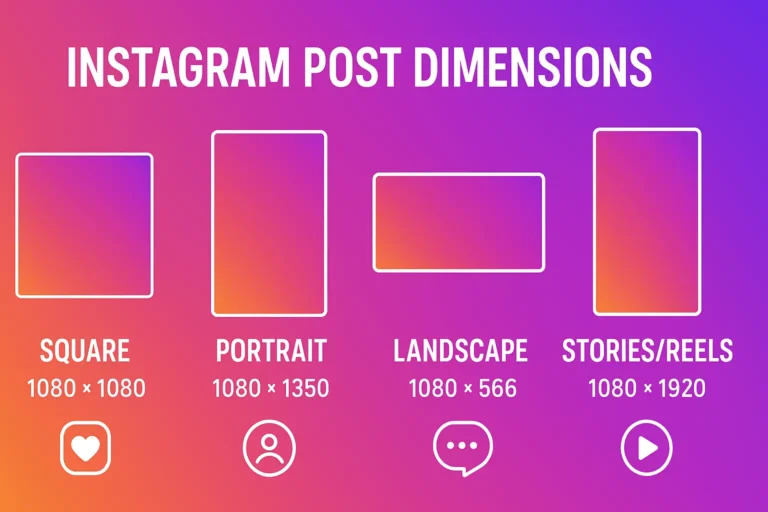
- Set Your Canvas Size: In Canva, create a custom size of 1080 x 1350 pixels (a perfect 4:5 portrait ratio for Instagram feed posts).
- Build the Layout: Add placeholder shapes for images, lines for text, and your logo in a subtle corner. Use the “Position” tool to align everything perfectly.
- Save as a Template: Once you’re happy, click “File” > “Save as template” and give it a name like “My Brand – Carousel Cover.” Now you can find it easily every time you want to create a new post.
Conclusion: Your Template Journey Starts Now
Learning how to find templates on Instagram is a simple skill that pays massive dividends. It transforms content creation from a daunting chore into an efficient, even enjoyable, process.
To recap the three incredibly simple methods:
- Use Instagram’s Native Gallery for quick, trending Reels.
- Explore Creator Marketplaces like Canva and Etsy for professional, brand-specific designs.
- Get Inspired by Other Accounts to reverse-engineer and create your own unique templates.
By consistently using Instagram templates, you’ll build a stronger brand, save countless hours, and free up your creative energy to focus on what really matters—connecting with your audience. So, open up Instagram or Canva and try one of these methods today!
Frequently Asked Questions (FAQ)
Q1: Are Instagram templates free?
A: Many are! Instagram’s native Reels templates are completely free. Platforms like Canva and Pinterest also offer thousands of free Instagram templates. Premium, more unique templates from sites like Etsy or Creative Market usually come with a small cost.
Q2: Can I use Instagram templates for Stories?
A: Absolutely! While Instagram’s native template gallery is mainly for Reels, the vast world of external templates includes countless options for Stories. Search for “Instagram Story template” on Canva or other marketplaces to find animated and static designs perfect for your Stories.
Q3: Do I need design skills to use an Instagram post template?
A: Not at all. The entire point of templates is to make design accessible to everyone. Tools like Canva are drag-and-drop, allowing you to easily change text and images without any prior graphic design experience.
Q4: Why can’t I find the Templates button when I try to make a Reel?
A: Ensure your Instagram app is updated to the latest version. This feature is rolled out globally, but an outdated app might be the culprit. If it’s updated and still missing, it could be a slow server-side rollout from Instagram.
Q5: How do I make sure my templates look consistent with my brand?
A: The key is customization. When you find a template you like, always customize it with your specific brand colors, fonts, and logo. Create a “Brand Kit” in Canva Pro to save your colors and fonts, making it effortless to apply them to any new template you use. This ensures all your Instagram templates work together to build a cohesive identity.