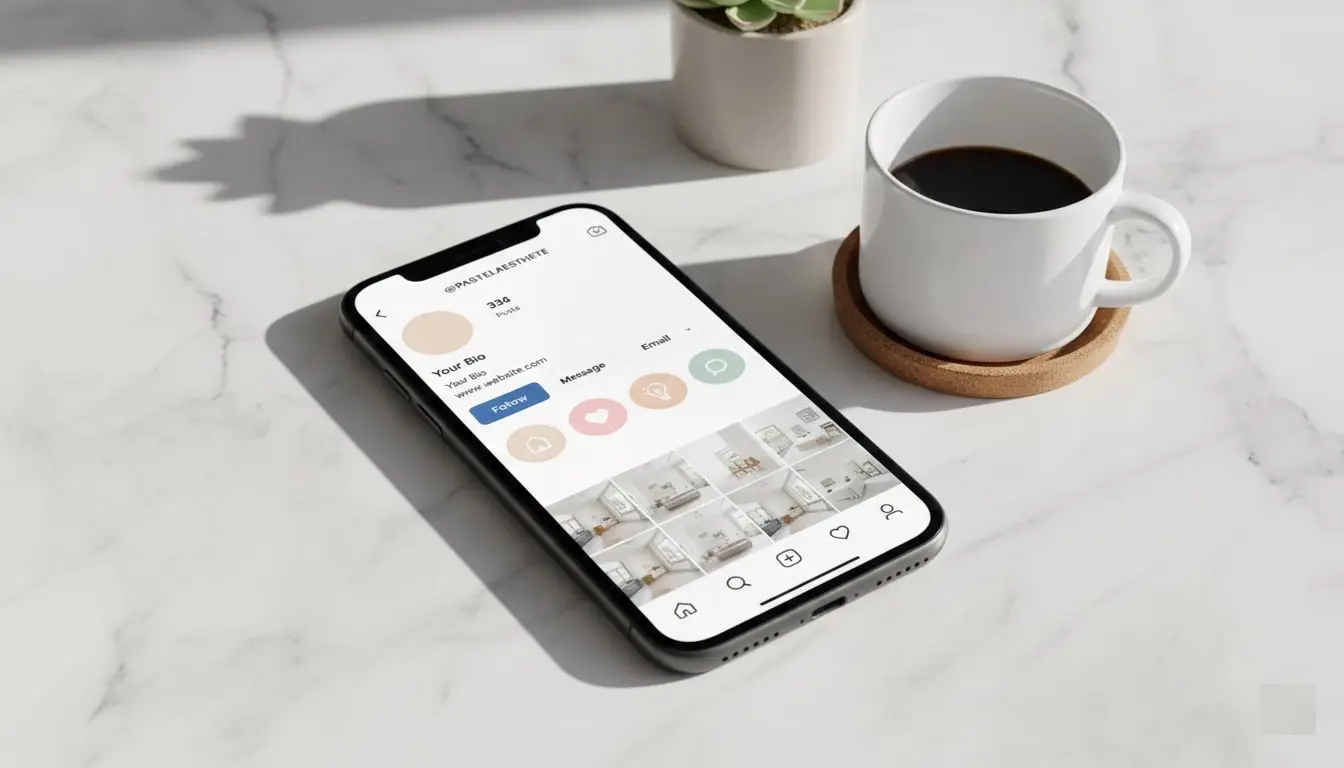
Instagram Highlight Covers: 50+ Free Templates & Design Ideas (2025)
Your Instagram profile is your digital storefront, and Instagram Highlight covers are the elegant finishing touch that transforms a basic profile into a professional brand presence. These small circular icons sitting beneath your bio might seem insignificant, but they’re powerful tools for organizing content and showcasing your brand personality.
In this comprehensive guide, you’ll discover over 50 free template options, learn professional design techniques, and master the art of creating cohesive Instagram Highlight covers that captivate your audience. Whether you’re a business owner, influencer, or content creator, you’ll find everything needed to elevate your profile aesthetic today.
Table of Contents
What Are Instagram Highlight Covers?
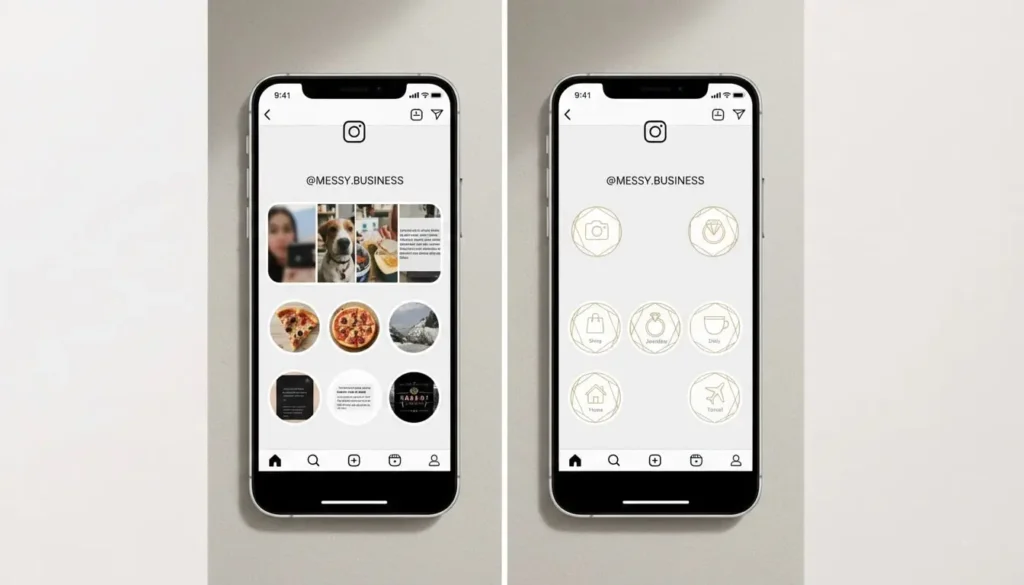
Instagram Highlight covers are custom images that represent your saved Story collections on your profile. These circular graphics appear below your bio section, allowing visitors to quickly access categorized content without scrolling through your entire feed.
Think of them as virtual file folders with personalized labels. Instead of generic story thumbnails, Instagram Highlight covers display branded icons or images that match your aesthetic. They serve both functional and visual purposes—organizing content while enhancing your profile’s professional appearance.
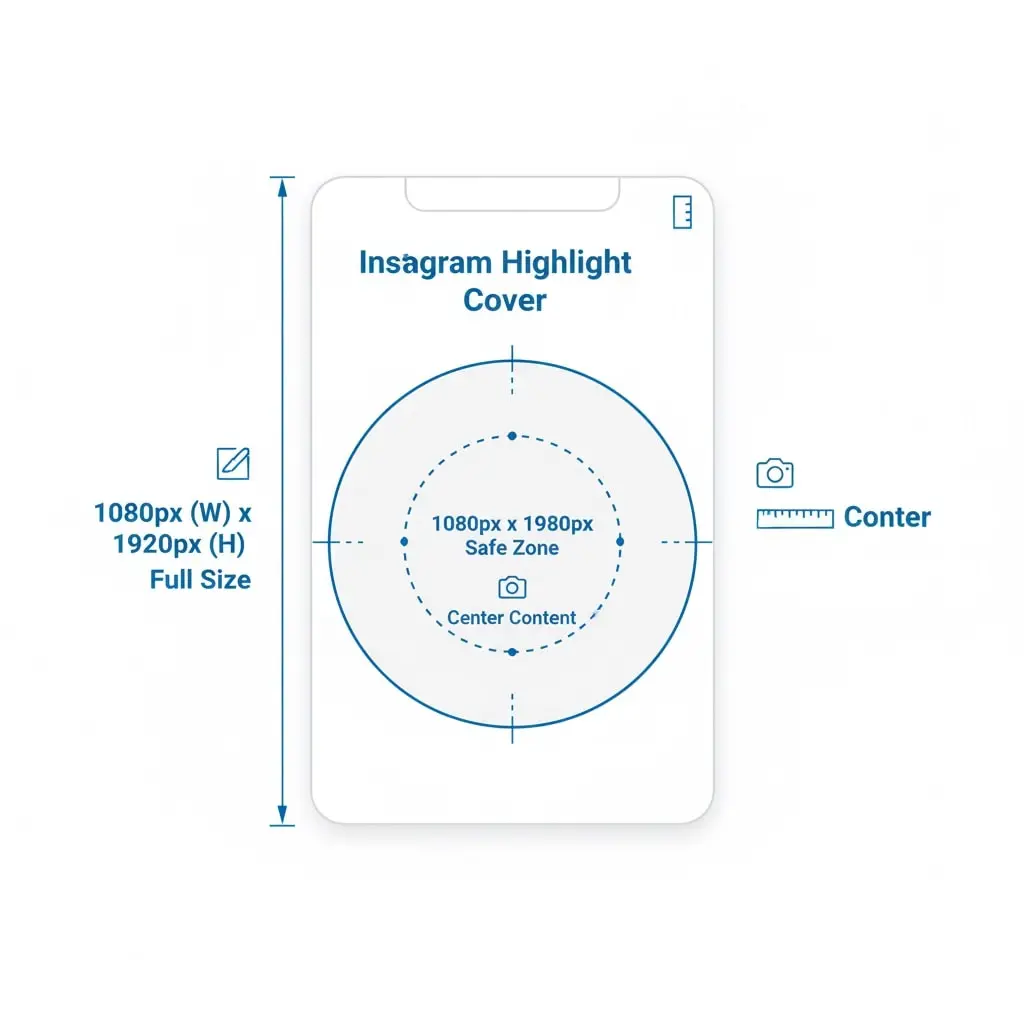
Each cover measures 1080 x 1920 pixels (standard Story dimensions), but Instagram displays them as small circles. The critical design area is the center 1080 x 1080 pixel square, which remains visible after cropping.
Why Instagram Highlight Covers Matter for Your Brand
First Impressions Count
When someone visits your profile, they form an opinion within 0.05 seconds. Well-designed Instagram Highlight covers immediately signal professionalism and attention to detail. They communicate that you care about your brand presentation and value your audience’s experience.
Improved User Experience
Custom covers help visitors navigate your content effortlessly. Instead of guessing what each Highlight contains, clear icons and labels guide them directly to relevant information. A beauty brand might feature covers labeled “Tutorials,” “Products,” “Reviews,” and “Behind the Scenes”—each with distinct visual identifiers.
Brand Consistency
Instagram Highlight covers create visual harmony across your profile. When designed cohesively with matching colors, fonts, and styles, they reinforce brand recognition. This consistency builds trust and makes your profile memorable in a crowded social landscape.
Increased Engagement
Organized content encourages exploration. When visitors can easily find what interests them through clear Instagram Highlight covers, they’re more likely to watch multiple stories, leading to higher engagement rates and stronger connections with your audience.

10 Design Styles for Instagram Highlight Covers in 2025
1. Minimalist Line Icons
Clean, simple line drawings remain timeless. Black or white icons on solid backgrounds create sophisticated Instagram Highlight covers that work for any niche. This style suits professional services, lifestyle brands, and modern aesthetics.
Best for: Coaches, consultants, minimalist brands, professional services
2. Colorful Gradient Backgrounds
Vibrant gradients inject energy into profiles. Combine trending color combinations like sunset oranges and pinks, or ocean blues and teals. Add simple white icons overtop for contrast. These Instagram Highlight covers attract attention while maintaining readability.
Best for: Creative industries, fashion, beauty, youth-oriented brands
3. Watercolor and Artistic Styles
Soft watercolor textures create feminine, elegant Instagram Highlight covers perfect for lifestyle and wellness brands. Hand-painted effects add personality and differentiate your profile from competitors using standard templates.
Best for: Wellness coaches, lifestyle bloggers, feminine brands, artists
4. Bold Geometric Patterns
Geometric shapes make striking Instagram Highlight covers that command attention. Triangles, hexagons, and abstract patterns create modern, edgy aesthetics. Pair with bold typography for maximum impact.
Best for: Tech companies, modern brands, design agencies, fashion-forward businesses
5. Photography-Based Covers
Real photos create authentic Instagram Highlight cover that showcase your work. Food bloggers can use dish photos, travel accounts can feature destination imagery, and photographers can display their portfolio samples.
Best for: Photographers, food bloggers, travel accounts, product-based businesses
6. Neon and Retro Aesthetics
Neon signs and 80s-inspired Instagram Highlight cover bring nostalgic vibes. These trendy designs work exceptionally well for entertainment, nightlife, and youthful brands wanting to stand out.
Best for: Entertainment, nightlife, music, youth brands
7. Nature and Organic Elements
Botanical illustrations and earthy tones create calming Instagram Highlight covers ideal for eco-friendly brands. Leaves, flowers, and natural textures communicate sustainability and organic values.
Best for: Sustainable brands, wellness, organic products, eco-conscious businesses
8. Marble and Luxury Textures
Marble, gold foil, and metallic Instagram Highlight covers exude luxury and sophistication. These premium-looking designs attract high-end clientele and elevate perceived value.
Best for: Luxury brands, jewelry, high-end services, premium products
9. Illustrated Character Covers
Custom illustrations and characters add playful personality. Cartoon-style Instagram Highlight cover work wonderfully for children’s brands, entertainment, and businesses wanting friendly, approachable aesthetics.
Best for: Children’s brands, entertainment, playful businesses, educators
10. Typography-Focused Designs
Bold text-only Instagram Highlight covers make statements. Choose elegant fonts and clear categories. This straightforward approach ensures visitors immediately understand each section’s content.
Best for: News outlets, publishers, quote accounts, text-heavy content
Step-by-Step: How to Create Instagram Highlight Covers
Step 1: Define Your Categories
Before designing, determine which Highlights your profile needs. Common categories include:
- About/Info
- Products/Shop
- Testimonials/Reviews
- Behind the Scenes/BTS
- Tips/Tutorials
- Events
- FAQ
- Contact
- Blog/Articles
- Team/Meet Us
Most profiles benefit from 5-10 Highlights. Too many overwhelm visitors, while too few underutilize the feature.
Step 2: Choose Your Design Tool
Several platforms simplify creating Instagram Highlight covers:
Canva (Free + Pro)
- Thousands of templates
- Drag-and-drop interface
- Mobile app available
- Pre-sized Story templates
Adobe Express (Free + Premium)
- Professional-quality designs
- Adobe Creative Cloud integration
- Advanced editing tools
Over (Free + Pro)
- Mobile-first design
- Font library
- Quick editing
Figma (Free + Pro)
- Vector graphics
- Collaborative design
- Unlimited revisions
Step 3: Design Your Covers
Set Correct Dimensions: Use 1080 x 1920 pixels (Story size), but keep important elements within the center 1080 x 1080 pixel circle.
Choose Your Color Palette: Select 2-4 colors matching your brand. Consistency across all Instagram Highlight covers creates cohesive aesthetics.
Select Icons or Graphics: Choose clear, recognizable symbols representing each category. A shopping bag for “Shop,” camera for “Photos,” heart for “Favorites.”
Add Text (Optional): Include category labels if icons alone aren’t self-explanatory. Use readable fonts sized appropriately for small circles.
Maintain Consistency: Apply the same design style, colors, and spacing across all covers. This uniformity strengthens brand recognition.
Step 4: Export and Upload
Export each design as PNG for best quality. Save files with descriptive names like “Highlight-Shop.png” for organization.
To upload custom Instagram Highlight covers:
- Open Instagram and go to your profile
- Tap the Highlight you want to customize
- Tap “More” (three dots) in the bottom right
- Select “Edit Highlight”
- Tap “Edit Cover”
- Choose “Select from Gallery”
- Select your custom cover image
- Adjust positioning to center the design
- Tap “Done”
Step 5: Organize Your Highlights
Arrange Highlights strategically. Place your most important categories first (left side), as these receive prime visibility. Consider this hierarchy:
- Shop/Products (for businesses)
- About/Info (for personal brands)
- Popular content categories
- Supporting content
- Less critical information
50+ Free Instagram Highlight Covers Templates
Minimalist Collection (10 Templates)
- Classic Black & White Set – Simple line icons on contrasting backgrounds
- Soft Beige Neutrals – Warm, earthy tones with gold accents
- Clean Gray Palette – Professional, corporate-friendly designs
- Monochrome Elegance – All-white or all-black sophisticated covers
- Scandinavian Simplicity – Light backgrounds with subtle icons
- Modern Line Art – Continuous line drawings
- Geometric Minimalism – Basic shapes and forms
- Negative Space Designs – Smart use of empty space
- Swiss Style Graphics – Grid-based, ultra-clean layouts
- Bauhaus-Inspired – Functional, geometric aesthetics
Colorful & Vibrant Collection (10 Templates)
- Rainbow Spectrum – Each cover features different rainbow colors
- Pastel Dreams – Soft, muted color combinations
- Bold Neon Set – High-contrast, attention-grabbing designs
- Tropical Vibes – Bright oranges, pinks, and turquoise
- Sunset Gradients – Warm color transitions
- Ocean Blues – Calming blue and teal palettes
- Spring Pastels – Light pinks, yellows, and greens
- Autumn Warmth – Rich oranges, browns, and burgundy
- Jewel Tones – Deep, luxurious colors
- Candy Pop – Sweet, playful color mixes
Business & Professional Collection (10 Templates)
- Corporate Modern – Sleek designs for professional services
- Real Estate Luxury – Elegant covers for property professionals
- Finance & Banking – Trust-building, professional aesthetics
- Law Firm Sophistication – Conservative, authoritative designs
- Medical & Healthcare – Clean, trustworthy covers
- Education & Training – Academic, professional look
- Consulting Services – Expert-positioning designs
- Technology & SaaS – Modern, innovative styles
- B2B Marketing – Professional yet approachable
- Executive Coaching – Leadership-focused aesthetics
Creative & Artistic Collection (10 Templates)
- Watercolor Botanical – Hand-painted floral elements
- Abstract Art – Unique, artistic expressions
- Illustration Set – Custom drawn characters and objects
- Collage Style – Mixed media aesthetics
- Typography Art – Creative text-based designs
- Street Art Inspired – Urban, edgy graphics
- Pop Art Style – Bold, comic-book aesthetics
- Vintage Poster – Retro design elements
- Mid-Century Modern – Classic 1950s-60s style
- Contemporary Art – Cutting-edge artistic designs
Niche-Specific Collection (10+ Templates)
- Fitness & Wellness – Active lifestyle imagery
- Beauty & Cosmetics – Glamorous, feminine designs
- Food & Restaurant – Appetizing culinary graphics
- Travel & Adventure – Wanderlust-inspiring covers
- Fashion & Style – Trendy, chic aesthetics
- Photography Portfolio – Camera and lens iconography
- Wedding & Events – Elegant celebration designs
- Pet & Animal Lovers – Cute, animal-themed covers
- Parenting & Family – Warm, family-friendly graphics
- Home & Interior Design – Stylish living space themes
- Gaming & Esports – Dynamic, tech-forward designs
- Music & Entertainment – Performance and audio graphics
- Sustainable Living – Eco-friendly, green aesthetics
- Craft & DIY – Handmade, creative project themes
Instagram Highlight Covers: Best Practices for Maximum Impact
Size and Dimension Guidelines
Always design Instagram Highlight covers at 1080 x 1920 pixels. However, Instagram crops them into circles, displaying only the center portion. Keep all important elements—icons, text, and graphics—within a centered 1080 x 1080 pixel safe zone.
Test your designs before finalizing. Upload a sample to see how Instagram crops it. Adjust positioning if critical elements get cut off.
Color Psychology and Selection
Colors evoke emotions and communicate brand values. When designing Instagram Highlight covers
, consider:
- Blue: Trust, professionalism, calmness (ideal for corporate brands)
- Red: Energy, passion, urgency (perfect for sales and entertainment)
- Green: Growth, health, sustainability (excellent for wellness brands)
- Purple: Luxury, creativity, spirituality (suits premium offerings)
- Orange: Enthusiasm, creativity, friendliness (works for approachable brands)
- Pink: Femininity, compassion, playfulness (ideal for beauty and lifestyle)
- Black: Sophistication, elegance, power (perfect for luxury brands)
- White: Purity, simplicity, cleanliness (suits minimalist aesthetics)
Limit your palette to 2-4 colors maximum across all Instagram Highlight cover
for cohesive branding.
Icon Selection and Clarity
Choose universally recognizable icons. A shopping cart clearly indicates “Shop,” while a question mark obviously represents “FAQ.” Avoid abstract symbols that require interpretation.
Icons should remain visible at small sizes. Test by viewing them at actual display dimensions—approximately 77 x 77 pixels on mobile devices. If details disappear, simplify the design.
Text Considerations
While Instagram Highlight covers can include text, it must be large and bold to remain readable. Many designers skip text entirely, relying on clear icons and Highlight names for communication.
If adding text:
- Use sans-serif fonts for maximum readability
- Keep it to 1-2 words maximum
- Choose high-contrast colors (dark text on light backgrounds or vice versa)
- Size text generously—it displays very small
Consistency Across Your Profile
All Instagram Highlight covers should feel like family members—related but distinct. Maintain consistency through:
- Color scheme: Use the same palette across all covers
- Style: Stick to one design approach (minimalist, colorful, illustrated, etc.)
- Icon style: Match line weights, styles, and complexity
- Background treatment: Consistent solid colors, gradients, or patterns
- Spacing: Equal padding and positioning across covers
This cohesion creates professional, polished profiles that attract and retain followers.
Advanced Design Tips for Professional Instagram Highlight Cover
Creating Depth and Dimension
Flat designs work beautifully for Instagram Highlight cover, but adding subtle depth elevates them. Consider:
- Drop shadows: Soft shadows behind icons create floating effects
- Gradients: Subtle color transitions add sophistication
- Layering: Overlap elements strategically for visual interest
- Texture overlays: Light grain or noise adds tactile quality
Keep effects subtle. Heavy-handed treatments appear unprofessional and date quickly.
Seasonal Updates and Refreshes
Update Instagram Highlight cover seasonally to maintain fresh, relevant profiles. Holiday-themed covers show attention to detail and keep content current.
Create variations:
- Winter: Snowflakes, cool blues, holiday themes
- Spring: Florals, pastels, renewal imagery
- Summer: Bright colors, sun motifs, vacation vibes
- Fall: Warm tones, leaves, harvest themes
Save master templates for easy updates. Swap color palettes or add seasonal elements without complete redesigns.
Accessibility Considerations
Design inclusive Instagram Highlight covers that everyone can appreciate:
- Contrast ratios: Ensure 4.5:1 minimum contrast between text and backgrounds
- Color blindness: Don’t rely solely on color to convey meaning; use shapes and labels
- Simplicity: Clear, straightforward designs benefit all users
- Testing: View designs in grayscale to check legibility
Accessible design isn’t just ethical—it expands your potential audience.
Animation and Motion Graphics
While Instagram doesn’t support animated Instagram Highlight covers directly, you can create visual interest through strategic Story content. Some advanced users create short animated sequences as their Highlight covers, though these require technical knowledge and appear only when someone views the Highlight.
For most users, static designs remain the practical, professional choice.
Common Mistakes to Avoid with Instagram Highlight Covers
Mistake 1: Ignoring the Circular Crop
The most common error is designing square images without considering Instagram’s circular crop. Important elements positioned in corners get cut off, ruining the composition.
Solution: Always work within the center circular safe zone. Most design tools offer circular guides or templates specifically for Instagram Highlight covers.
Mistake 2: Over-Complicated Designs
Cluttered, busy Instagram Highlight covers become illegible at small sizes. Too many details, thin lines, or small text disappear when displayed as tiny circles.
Solution: Embrace simplicity. Bold, clear icons and minimal elements ensure visibility and impact.
Mistake 3: Inconsistent Styling
Random design styles across covers create chaotic, unprofessional profiles. Mixing minimalist, watercolor, and neon Instagram Highlight covers confuses visitors and weakens brand identity.
Solution: Commit to one cohesive style across all covers. Maintain consistent colors, icon styles, and treatments.
Mistake 4: Poor Color Contrast
Low contrast between icons and backgrounds makes Instagram Highlight covers difficult to see. Light gray icons on white backgrounds or dark blue on black create readability issues.
Solution: Use high-contrast combinations. Test designs by converting to grayscale—if elements disappear, increase contrast.
Mistake 5: Using Low-Resolution Images
Pixelated, blurry Instagram Highlight covers scream unprofessional. Using images smaller than 1080 x 1920 pixels results in quality loss.
Solution: Always design at full resolution (1080 x 1920 pixels) and export as high-quality PNGs.
Mistake 6: Neglecting Mobile Preview
Designs look different on mobile devices—where most users view them—compared to desktop editors. Colors may appear differently, and small details vanish.
Solution: Always preview designs on actual mobile devices before finalizing. Make adjustments based on real-world appearance.
Mistake 7: Too Many Highlights
Overcrowding profiles with 15+ Highlights overwhelms visitors. Too many options create decision paralysis, and covers become too small to distinguish.
Solution: Limit to 5-10 strategic Highlights featuring your most important content categories
Tools and Resources for Creating Instagram Highlight Covers
Free Design Platforms
Canva The most popular choice for creating Instagram Highlight covers. Offers thousands of free templates, extensive icon libraries, and intuitive drag-and-drop editing. The free plan provides everything most users need.
Adobe Express Formerly Adobe Spark, this platform delivers professional-quality results. Free tier includes thousands of templates and Adobe’s premium design tools.
Crello (VistaCreate) Budget-friendly alternative with excellent template selection. Particularly strong for social media graphics including Instagram Highlight covers.
Icon Libraries
The Noun Project Millions of icons available for Instagram Highlight covers. Free basic membership with attribution; Pro membership ($9.99/month) removes attribution requirements.
Flaticon Extensive free icon database with premium options. Excellent search functionality helps find perfect icons for your covers.
Font Awesome Free, scalable vector icons perfect for Instagram Highlight covers. Web-focused but works beautifully for social graphics.
Mobile Apps
Over Mobile-first design app specifically for social media graphics. Create and edit Instagram Highlight covers directly on your phone.
Unfold Template-based app with beautiful, curated designs. Perfect for creating cohesive Instagram Highlight covers on the go.
StoryArt Specializes in Instagram Story designs, including Highlight covers. Simple interface ideal for beginners.
Instagram Highlight Covers SEO and Discoverability
While Instagram Highlight covers themselves don’t directly impact SEO, strategic naming and organization improve profile discoverability and user experience.
Optimizing Highlight Names
Choose clear, keyword-rich names for your Highlights:
- Use searchable terms potential followers might look for
- Keep names concise (under 15 characters for full visibility)
- Prioritize clarity over creativity
- Include relevant emojis sparingly for visual interest
Examples:
- “Shop 🛍️” instead of “Stuff to Buy”
- “Tutorials 📚” instead of “Learn”
- “Reviews ⭐” instead of “What They Say”
Strategic Content Organization
Well-organized Highlights improve user experience, encouraging longer profile visits and increased engagement—signals that indirectly boost your overall Instagram presence.
Group related content logically. A fitness coach might organize:
- Workouts
- Nutrition
- Client Results
- Tips & Tricks
- FAQ
This structure helps visitors find relevant information quickly, improving satisfaction and conversion rates.
Cross-Promotion Opportunities
Reference your Instagram Highlight covers and organized content in:
- Bio descriptions
- Post captions
- Story CTAs
- Direct messages
- External marketing materials
This cross-promotion drives traffic to your carefully curated Highlights, maximizing their value.
Conclusion: Elevate Your Profile with Professional Instagram Highlight Covers
Instagram Highlight covers represent small investments with significant returns. These circular graphics organize content, strengthen brand identity, and create professional first impressions that convert casual visitors into engaged followers.
Whether you choose minimalist line icons, colorful gradients, or illustrated designs, maintaining consistency and clarity ensures your Instagram Highlight covers work effectively. Start with free templates to establish your aesthetic, then consider custom designs as your brand evolves.
Remember: great Instagram Highlight covers don’t exist in isolation. They’re one element of comprehensive profile optimization including compelling bios, strategic content, and authentic engagement. When combined thoughtfully, these components create magnetic Instagram presences that attract and retain loyal audiences.
Ready to transform your profile? Download our free template collection and start designing stunning Instagram Highlight covers today. Your professional, polished profile awaits—and it’s just a few clicks away.
Frequently Asked Questions About Instagram Highlight Covers
Q: What size should Instagram Highlight covers be? Design Instagram Highlight covers at 1080 x 1920 pixels (Story dimensions), but keep important elements within the center 1080 x 1080 pixel circle, as Instagram crops them into circles.
Q: Can I change Instagram Highlight covers after uploading? Yes, edit existing Instagram Highlight covers anytime by opening the Highlight, tapping the three dots, selecting “Edit Highlight,” then “Edit Cover” to upload new images.
Q: Do I need design skills to create Instagram Highlight covers? No, platforms like Canva offer thousands of pre-made Instagram Highlight covers requiring zero design experience. Simply customize colors and icons to match your brand.
Q: How many Highlights should I have? Most profiles benefit from 5-10 Highlights. Too many overwhelm visitors, while effective Instagram Highlight covers organize content into clear, strategic categories.
Q: Are free Instagram Highlight covers as good as paid ones? Free Instagram Highlight covers work perfectly for most users. Paid templates offer unique designs and commercial licenses, beneficial for businesses wanting exclusive aesthetics.
Q: Can I use the same covers as other accounts? While legal, using identical Instagram Highlight covers as competitors weakens brand differentiation. Customize templates with your colors, fonts, and icons for unique results.
Q: Should Instagram Highlight covers include text? Text is optional. Many effective Instagram Highlight covers use only icons, relying on Highlight names for context. If adding text, use large, bold fonts for readability.
Q: How often should I update my Instagram Highlight covers? Update Instagram Highlight covers when rebranding or seasonally (quarterly) to maintain fresh, current aesthetics. Consistent changes show active profile management.