Instagram Story Highlight Icons: 200+ Free & Premium Designs (2025)
Your Instagram profile is your digital storefront, and nothing makes it more professional than beautifully designed Instagram story highlight icons. These small circular images beneath your bio are often the first thing visitors notice, serving as visual navigation to your best Stories content.
In 2025, Instagram story highlight icons have evolved from simple text circles to sophisticated brand elements that communicate personality, professionalism, and purpose at a glance. Whether you’re a business owner, content creator, or influencer, having cohesive highlight covers can increase profile engagement by up to 45%.
This comprehensive guide will walk you through everything you need to know about Instagram story highlight icons—from understanding their impact to finding the perfect designs and creating your own. We’ll explore over 200 free and premium options, customization techniques, and strategic implementation tips that will transform your Instagram presence.
By the end of this article, you’ll know exactly how to select, customize, and optimize your highlight covers to create a memorable first impression that converts profile visitors into engaged followers.
Table of Contents
What Are Instagram Story Highlight Icons?
Instagram story highlight icons are the circular cover images that represent saved Story collections on your profile. Unlike regular Stories that disappear after 24 hours, Highlights remain permanently on your profile, organized under custom categories you create.
Each highlight needs a cover image—this is where Instagram story highlight icons come into play. These icons serve as visual labels that help visitors quickly understand what content each highlight contains. Think of them as chapter titles in book form, but visual.
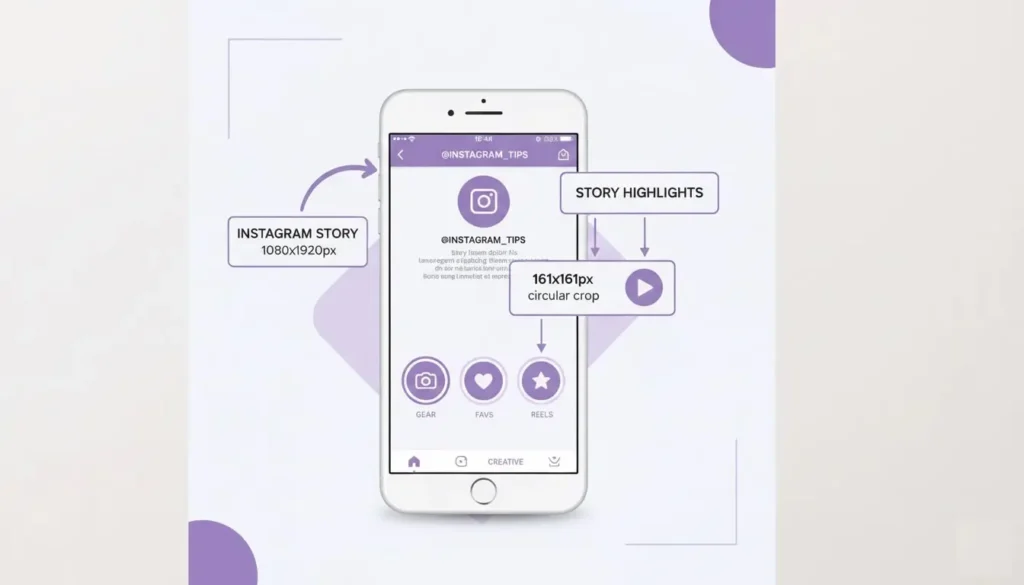
The standard specifications for these covers are:
- Size: 1080 x 1920 pixels (Instagram Story dimensions)
- Visible area: Approximately 161 x 161 pixels (the circular crop)
- Format: PNG or JPEG
- File size: Under 8MB
When designing Instagram story highlight icons, the most important consideration is that your design elements should be centered within a safe zone, as Instagram crops them into circles. Anything outside this circular area won’t be visible.
Professional highlight covers typically include simple icons, minimal text, or abstract designs that remain recognizable even at small sizes. The best Instagram story highlight icons maintain clarity and readability on mobile devices, where most viewing occurs.
Why Instagram Story Highlight Icons Matter for Your Brand
First Impressions Count
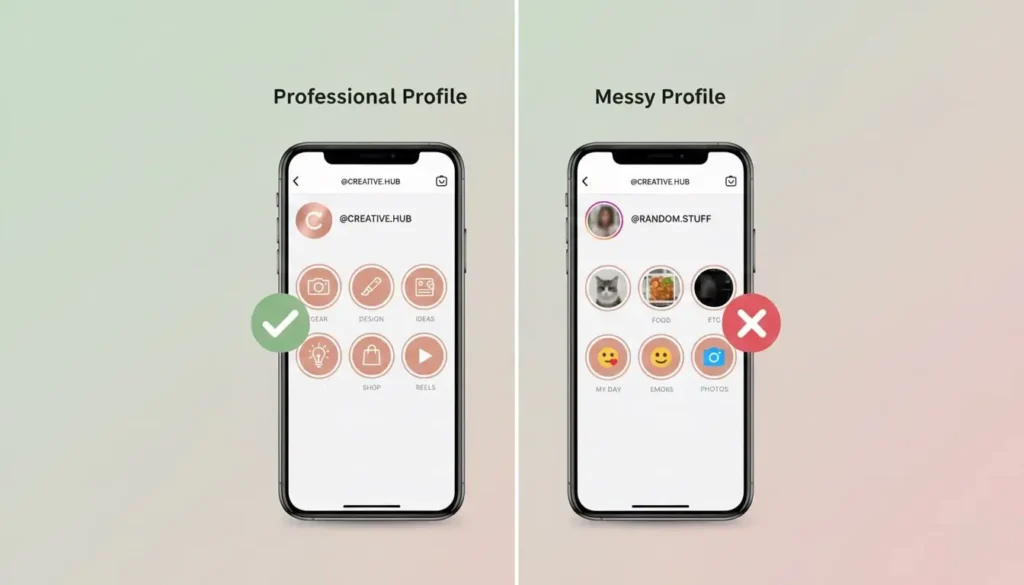
Your profile has approximately 3 seconds to capture a visitor’s attention. Well-designed Instagram story highlight icons immediately signal professionalism and attention to detail. They demonstrate that you’ve invested time in creating a cohesive brand experience.
Research shows that profiles with customized highlight covers receive 30% more profile visits compared to those using default Story thumbnails. This is because organized, attractive highlights invite exploration and make content easily discoverable.
Enhanced Navigation and User Experience
Instagram story highlight icons function as a navigation menu for your saved content. When visitors can quickly identify highlights like “Products,” “Testimonials,” “Behind the Scenes,” or “Tips,” they’re more likely to engage with multiple highlights.
Clear categorization through recognizable icons reduces friction in the user journey. Visitors don’t need to tap multiple highlights to find what they’re looking for—they can make informed decisions based on your icon designs.
Brand Consistency and Recognition
Using a consistent style for your Instagram story highlight icons reinforces brand identity. Whether you choose minimalist line art, bold colors, or illustrated designs, maintaining visual consistency across all highlights creates a polished, professional appearance.
This consistency extends your brand beyond just your feed. When someone takes a screenshot or shares your profile, those distinctive highlight covers become part of your visual signature.
Increased Engagement Metrics
Strategically designed highlight covers can guide visitors toward high-value content. By placing important categories first (like “Shop” or “Services”) with eye-catching icons, you can drive specific actions and increase conversion rates.
Analytics show that profiles with organized highlights see 25% longer average profile visit durations, as users spend time exploring categorized content rather than bouncing immediately.
Types of Instagram Story Highlight Icons: 200+ Design Options
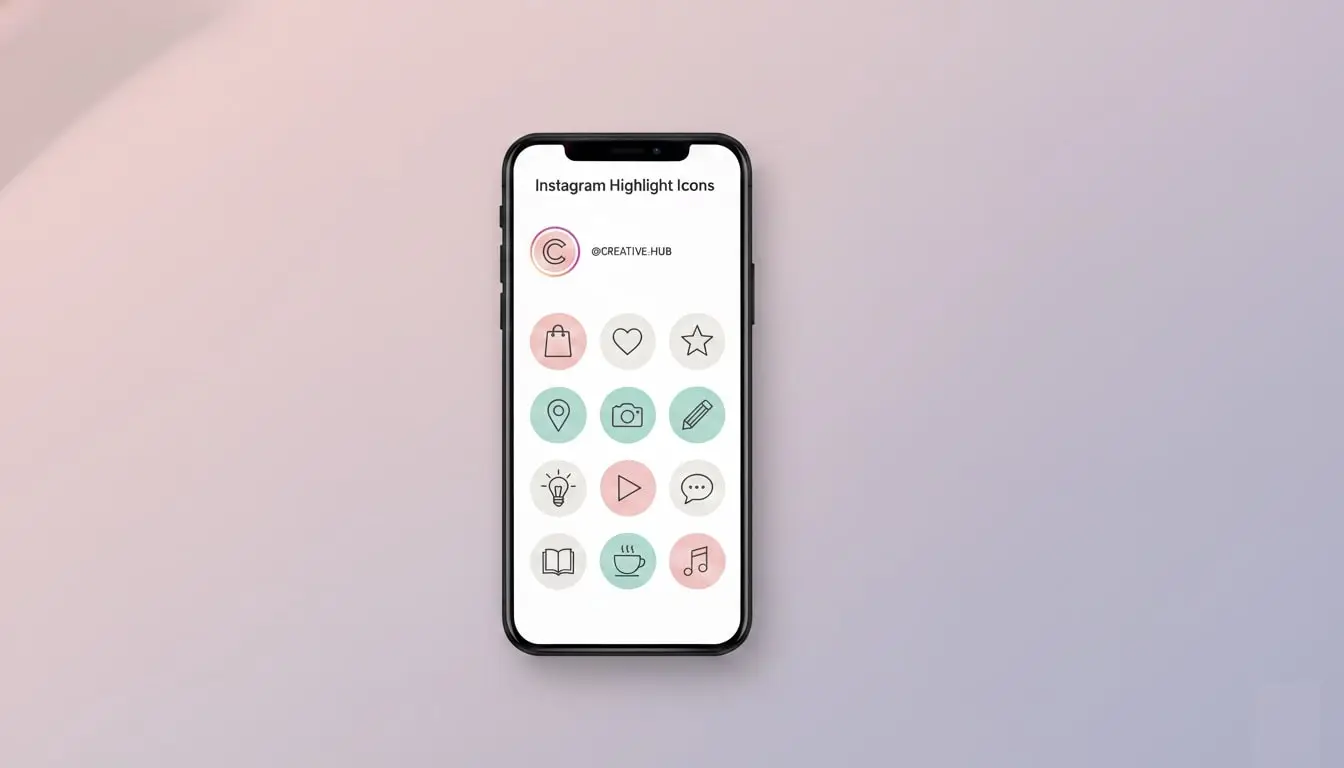
Minimalist Line Icons (Modern & Clean)
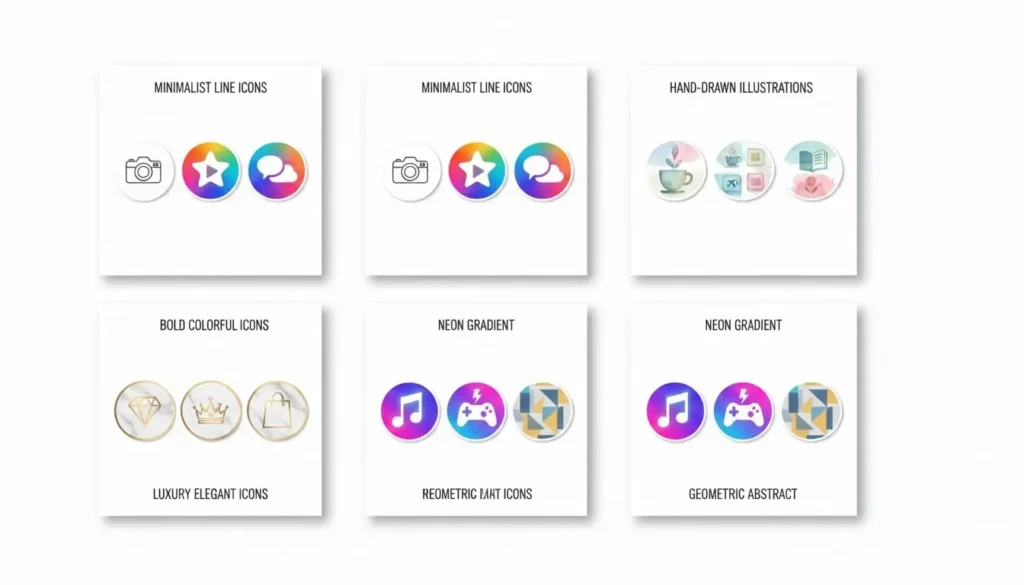
Minimalist Instagram story highlight icons feature simple line drawings with thin strokes and plenty of negative space. This style works exceptionally well for modern brands, coaches, photographers, and anyone seeking an elegant, timeless aesthetic.
Popular categories:
- Shopping bag, cart, and price tags for e-commerce
- Camera, video, and microphone for content creators
- Dumbbell, yoga mat, and nutrition icons for fitness
- Sparkle, lipstick, and mirror for beauty brands
- Laptop, briefcase, and calendar for business professionals
Minimalist designs remain legible at small sizes and work across various color schemes. They’re particularly effective when you want the focus to remain on your actual Story content rather than the covers.
Bold and Colorful Icons (Vibrant & Energetic)
For brands targeting younger audiences or those in creative industries, bold Instagram story highlight icons with vibrant colors create an energetic, playful profile aesthetic. These designs feature solid shapes, bright palettes, and high contrast.
Best for:
- Fashion and lifestyle brands
- Entertainment and events
- Food and beverage businesses
- Travel and adventure content
- Children’s products and services
Bold colored icons make your profile pop and can significantly increase tap-through rates on highlights. The key is maintaining color consistency across all covers while ensuring each icon remains distinct.
Illustrated and Hand-Drawn Icons (Personal & Unique)
Hand-drawn Instagram story highlight icons add personality and warmth to your profile. This style works beautifully for artisan brands, boutiques, creative professionals, and anyone wanting to showcase authenticity and craftsmanship.
These designs often feature:
- Watercolor textures
- Sketch-style illustrations
- Whimsical drawings
- Custom lettering
- Organic, imperfect lines
Illustrated covers help you stand out from competitors using generic stock icons. They communicate that you’ve invested in creating a unique brand experience.
Luxury and Elegant Icons (Sophisticated & Premium)
High-end brands require refined Instagram story highlight icons that communicate sophistication. These designs typically use metallic effects (gold, rose gold, silver), marble textures, or classic monograms.
Ideal categories:
- Jewelry and luxury fashion
- Wedding and event planning
- Premium beauty and cosmetics
- High-end real estate
- Luxury travel and hospitality
Luxury icons often incorporate serif fonts, delicate details, and muted or monochromatic color palettes. They should feel exclusive and aspirational while remaining functional.
Neon and Gradient Icons (Trendy & Modern)
Neon-style Instagram story highlight icons tap into current design trends with glowing effects and vibrant gradients. These eye-catching covers work well for tech companies, nightlife venues, modern brands, and anyone targeting Gen Z audiences.
Gradient icons featuring color transitions from one hue to another create depth and visual interest. Popular combinations include purple-to-pink, blue-to-teal, and sunset-inspired palettes.
Geometric and Abstract Icons (Artistic & Contemporary)
For brands wanting something different, geometric Instagram story highlight icons offer a contemporary, artistic approach. These designs use shapes, patterns, and abstract forms rather than literal icon representations.
This style suits:
- Interior designers and architects
- Modern art galleries
- Tech startups
- Progressive brands
- Experimental creatives
Geometric icons create visual intrigue and work especially well when paired with a cohesive color story across all highlights.
Where to Find the Best Instagram Story Highlight Icons
Canva: The Most Popular Platform
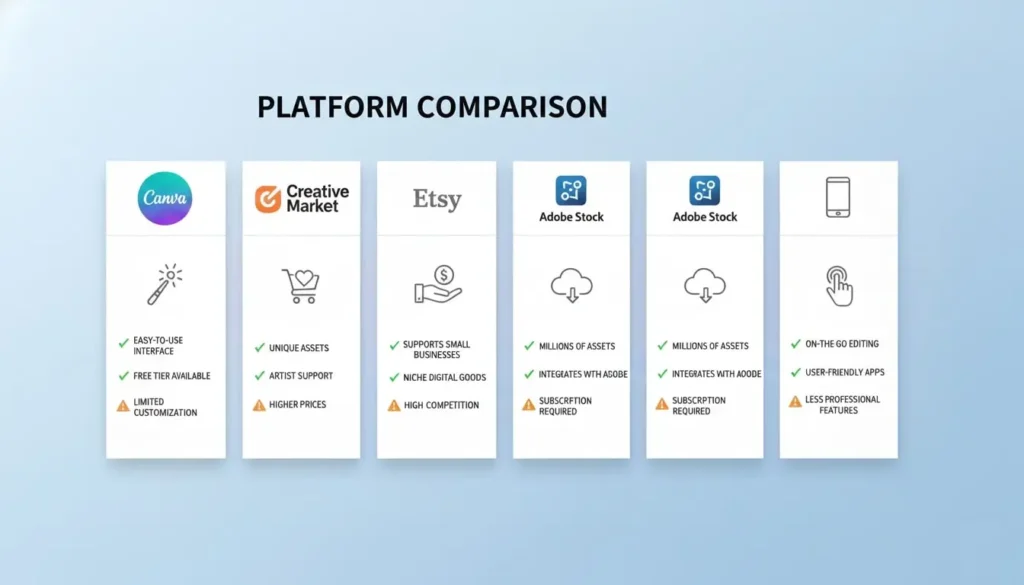
Canva offers the largest collection of free Instagram story highlight icons, with over 50,000 templates available. Their drag-and-drop editor makes customization incredibly simple, even for complete beginners.
Pros:
- Massive free library
- Easy customization tools
- Mobile app for editing on-the-go
- Pre-sized templates
- Brand kit feature for consistency
Cons:
- Popular designs may be overused
- Premium elements require Canva Pro subscription ($12.99/month)
- Limited truly unique options in free tier
Best for: Beginners, small businesses, and anyone needing quick, simple solutions.
Creative Market: Premium Quality Designs
Creative Market specializes in high-quality, unique Instagram story highlight icons created by independent designers. Prices typically range from $8 to $35 for complete sets of 20-50 icons.
Pros:
- Highly unique designs
- Professional quality
- Commercial use licenses included
- Supporting independent creators
- Exclusive styles not found elsewhere
Cons:
- Cost per set
- Requires design software for customization
- One-time purchase (not subscription)
Best for: Established brands wanting distinctive, professional covers that stand out.
Etsy: Affordable and Diverse Options
Etsy marketplace features thousands of Instagram story highlight icons from various sellers, with prices starting as low as $3 for complete sets. The platform offers incredible variety across all styles and niches.
Pros:
- Extremely affordable
- Niche-specific options
- Instant digital download
- Custom design services available
- Frequent sales and discounts
Cons:
- Quality varies by seller
- May require additional editing
- Need to verify commercial use rights
Best for: Budget-conscious creators and those seeking specific aesthetic styles.
Adobe Stock: Professional Photography and Graphics
Adobe Stock provides professionally created Instagram story highlight icons with the highest quality standards. Individual icons cost around $9.99, while subscription plans offer better value.
Pros:
- Premium professional quality
- Extensive search filters
- Seamless Adobe Creative Cloud integration
- Extended licensing options
- Curated collections
Cons:
- Higher price point
- Requires Adobe software knowledge for editing
- May feel corporate rather than personalized
Best for: Large businesses, marketing agencies, and brands with design resources.
Highlight Cover Apps: Mobile Solutions
Several mobile apps specialize in Instagram story highlight icons, including Highlight Cover Maker, Story Highlight Icons, and Canva’s mobile app.
Pros:
- Create directly on your phone
- No computer needed
- Quick implementation
- Often include brand color customization
- Some offer AI-powered suggestions
Cons:
- Limited compared to desktop options
- Subscription models common
- Less precise control
- Smaller design libraries
Best for: Instagram-first creators managing everything from mobile devices.
How to Create Custom Instagram Story Highlight Icons
Method 1: Using Canva (Beginner-Friendly)
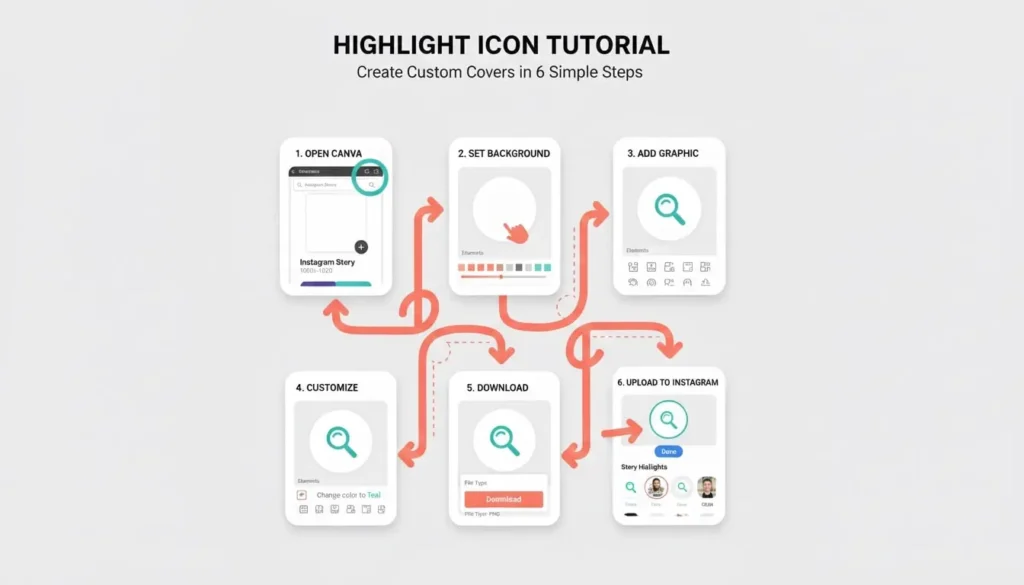
Step 1: Set Up Your Canvas Open Canva and search for “Instagram Story Highlight” templates or create a custom 1080 x 1920 pixel canvas. This ensures proper dimensions for your Instagram story highlight icons.
Step 2: Choose Your Background Select a background color that matches your brand palette. Most effective options include:
- Solid brand colors
- Subtle gradients
- Textured backgrounds
- Transparent backgrounds for layering
Step 3: Add Icon Elements Browse Canva’s element library for relevant icons. Search terms like “shopping,” “camera,” “heart,” or specific categories matching your highlight names. Position your icon in the center, keeping it within the circular safe zone.
Step 4: Add Text (Optional) Some Instagram story highlight icons work better with short labels. If adding text, use legible fonts sized 36pt or larger, positioned centrally for visibility after Instagram’s circular crop.
Step 5: Customize Colors Adjust icon and text colors to match your brand. Maintain sufficient contrast between background and foreground elements for clarity. Test how it looks at small sizes.
Step 6: Create Consistency Design all your Instagram story highlight icons in one session, duplicating your base template and only changing the icon element. This ensures perfect consistency across all covers.
Step 7: Download and Upload Download as PNG for best quality. Upload to your Instagram Highlights by editing each highlight and selecting “Edit Cover.”
Method 2: Using Adobe Illustrator (Advanced)
For designers seeking complete creative control over their Instagram story highlight icons, Adobe Illustrator provides unlimited possibilities.
Step 1: Create Artboard Set up a 1080 x 1920px artboard. Add a circular guide at 161 x 161px in the center to visualize the safe zone for your Instagram story highlight icons.
Step 2: Design Custom Icons Create original vector icons using the pen tool, shapes, and pathfinder operations. Vector graphics ensure perfect scalability and crisp edges.
Step 3: Apply Brand Styling Use your brand color swatches, create custom gradients, apply effects, and develop a cohesive visual system across all icons.
Step 4: Export Settings Export as PNG at actual size (1080 x 1920px) with 72 DPI for optimal Instagram display without unnecessary file size.
Method 3: Using Photoshop (Professional Quality)
Photoshop excels at creating photographic or heavily textured Instagram story highlight icons with advanced effects.
Step 1: Document Setup Create a new document at 1080 x 1920px, 72 DPI, RGB color mode. Add a circular marquee selection for your safe zone reference.
Step 2: Build Layers Organize your design with separate layers for background, textures, icon elements, text, and effects. This allows easy color adjustments later.
Step 3: Apply Effects Use layer styles, blending modes, filters, and adjustments to create depth. Popular effects for Instagram story highlight icons include drop shadows, inner glows, and gradient overlays.
Step 4: Batch Processing Once you perfect one design, create actions to automate repetitive steps across multiple icons, saving significant time.
Method 4: Using Free Online Tools
Several free tools make creating Instagram story highlight icons accessible without software:
Snappa: Browser-based design tool with pre-sized templates Desygner: Free tier with Instagram-specific dimensions Crello (VistaCreate): Template library with customization options PicMonkey: Photo editor with graphic design capabilities
These platforms bridge the gap between Canva’s simplicity and Adobe’s complexity, offering solid middle-ground solutions for your Instagram story highlight icons.
Best Practices for Instagram Story Highlight Icons
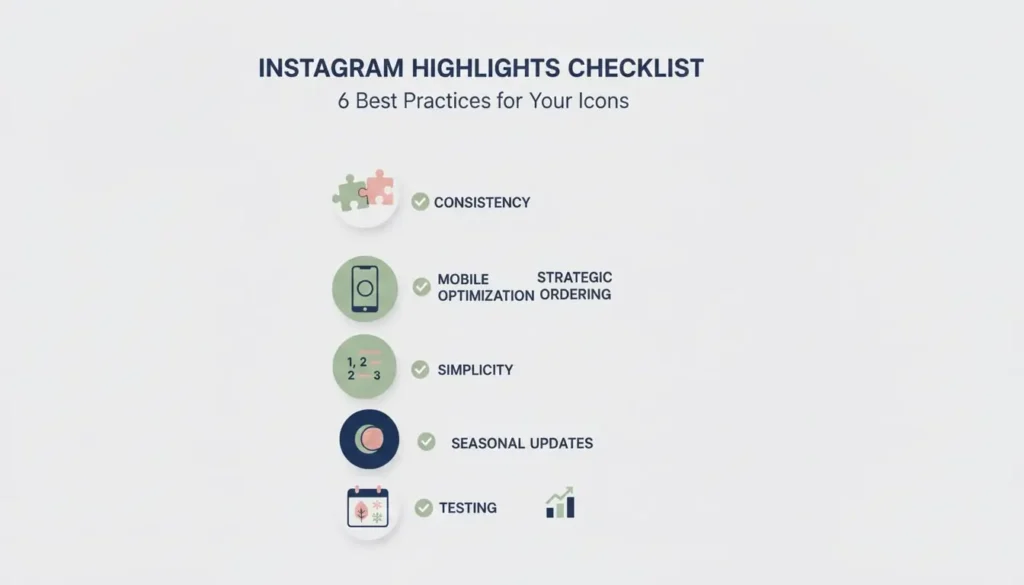
Maintain Visual Consistency
All your Instagram story highlight icons should follow the same design system. This means:
- Identical background colors or styles
- Same icon style (all line art, all filled, all illustrated)
- Consistent sizing of icon elements
- Matching color palettes
- Similar visual weight across all icons
Consistency creates a cohesive, professional appearance that strengthens brand recognition. Visitors should immediately recognize that all highlights belong to the same profile.
Optimize for Mobile Viewing
Remember that your Instagram story highlight icons will be viewed primarily on mobile devices at very small sizes. Test your designs by:
- Viewing them on your actual phone screen
- Reducing size to 50px diameter in your design software
- Ensuring icons remain recognizable when tiny
- Avoiding intricate details that disappear at small sizes
- Testing in both light and dark Instagram modes
Use Strategic Ordering
Instagram displays your highlights in the order you create them, but you can rearrange them. Place your most important categories first:
- Shop/Products – Drive sales immediately
- Services – Showcase what you offer
- Testimonials – Build social proof
- About – Tell your story
- FAQ – Answer common questions
Your Instagram story highlight icons should visually support this strategic ordering, with the most important categories having the most eye-catching designs.
Keep It Simple and Clear
Avoid the temptation to make your Instagram story highlight icons overly complex. The most effective designs feature:
- Single, recognizable icon or symbol
- Minimal text (0-2 words maximum)
- Clear, unambiguous imagery
- Sufficient white space
- High contrast for readability
Simple designs remain timeless and professional, while complex designs often look cluttered and confusing at small sizes.
Update Seasonally or for Campaigns
While consistency matters, refreshing your Instagram story highlight icons seasonally or for special campaigns keeps your profile feeling current. Consider updating:
- Holiday-themed covers (Christmas, Valentine’s, Halloween)
- Seasonal color palettes (spring pastels, autumn warm tones)
- Campaign-specific highlights (product launches, sales events)
- Annual refreshes to stay on-trend
Just ensure that any updates maintain your overall brand aesthetic and don’t confuse returning visitors.
Test Different Styles
Use Instagram Insights to track which highlights receive the most views and taps. Experiment with different Instagram story highlight icons styles to see what resonates with your audience:
- A/B test bold colors versus minimalist designs
- Try text-based versus icon-only covers
- Experiment with photography versus illustrations
- Test different category names and corresponding icons
Data-driven optimization ensures your highlight strategy aligns with audience preferences.
Common Mistakes to Avoid
Using Low-Resolution Images
Pixelated or blurry Instagram story highlight icons instantly undermine your professional appearance. Always design at the full 1080 x 1920 pixel resolution and export in PNG format for the highest quality.
Never upscale small images or use screenshots. Create designs at the correct size from the beginning, or download properly sized templates from reputable sources.
Inconsistent Design Elements
Mixing multiple styles across your Instagram story highlight icons creates visual chaos. Avoid combining:
- Different icon styles (line art with filled shapes)
- Clashing color palettes
- Various background treatments
- Mismatched sizing and spacing
- Different visual weights
Choose one cohesive design direction and apply it systematically across all highlights for a polished result.
Forgetting the Circular Crop
A common mistake is designing Instagram story highlight icons without considering Instagram’s circular crop. Important elements placed in corners or edges disappear completely.
Always design with a circular safe zone guide. Everything outside this circle won’t be visible, so keep all important design elements centered.
Overcomplicating the Design
Adding too many elements, excessive text, busy patterns, or intricate details makes Instagram story highlight icons illegible at small sizes. Remember: less is more.
Focus on one primary visual element per icon. If viewers need to squint or tap to understand your highlight covers, they’re too complex.
Ignoring Brand Guidelines
Your Instagram story highlight icons should align with your overall brand identity. Using random colors, fonts, or styles that don’t match your existing brand creates confusion and weakens brand recognition.
Reference your brand guidelines when designing, ensuring colors, fonts, and styles remain consistent with your website, logo, and other marketing materials.
Instagram Story Highlight Icons for Different Industries
E-Commerce and Retail
Effective Instagram story highlight icons for online stores include:
- Shopping cart or bag (Shop/Products)
- Package or shipping box (Shipping/Delivery)
- Star or badge (Reviews/Testimonials)
- Tag or ticket (Sales/Discounts)
- Question mark (FAQ/Help)
Retail brands benefit from clear, action-oriented icons that guide customers through the buying journey.
Beauty and Cosmetics
Beauty brands need Instagram story highlight icons that reflect their aesthetic:
- Lipstick or makeup brush (Products/Makeup)
- Sparkle or star (Featured/New)
- Face or mirror (Tutorials/Tips)
- Heart (Customer Love/Reviews)
- Crown (VIP/Exclusive)
Glamorous, elegant designs with rose gold, pink, or neutral palettes work exceptionally well for beauty industry highlight covers.
Fitness and Wellness
Health-focused Instagram story highlight icons should communicate energy and motivation:
- Dumbbell or kettlebell (Workouts/Training)
- Apple or salad (Nutrition/Recipes)
- Trophy or medal (Results/Transformations)
- Calendar (Challenges/Programs)
- Play button (Videos/Tutorials)
Active, energetic colors like orange, green, and blue reinforce the fitness lifestyle while maintaining professionalism.
Food and Restaurants
Culinary Instagram story highlight icons emphasize appetite appeal:
- Fork and knife (Menu/Dishes)
- Chef’s hat (Recipes/Cooking)
- Location pin (Locations/Visit Us)
- Clock (Hours/Reservations)
- Camera (Food Photography)
Warm, inviting colors and appetizing visuals encourage engagement with food-related content.
Coaches and Consultants
Professional service providers need Instagram story highlight icons that establish authority:
- Lightbulb (Tips/Advice)
- Book or graduation cap (Resources/Education)
- Speech bubble (Testimonials/Success Stories)
- Handshake (Services/Work With Me)
- Microphone (Podcast/Speaking)
Sophisticated, minimalist designs with professional color palettes (navy, gray, burgundy) build credibility.
Conclusion
Instagram story highlight icons are small design elements with enormous impact on your profile’s professionalism, navigability, and conversion potential. These circular covers serve as visual anchors that guide visitors through your most valuable content while reinforcing brand identity with every glance.
Throughout this guide, we’ve explored the strategic importance of highlight covers, examined over 200 design options across various styles, and provided detailed tutorials for creating custom icons. We’ve covered best practices for optimization, common mistakes to avoid, and industry-specific approaches that drive results.
Whether you choose free templates from Canva, invest in premium designs from Creative Market, or create fully custom Instagram story highlight icons using professional design software, the key is maintaining consistency, clarity, and alignment with your overall brand aesthetic.
Remember that your highlight covers are living elements of your profile strategy. Regularly review their performance through Instagram Insights, update them seasonally to stay fresh, and continuously optimize based on audience behavior. The most successful brands treat their Instagram story highlight icons as integral parts of their visual identity rather than afterthoughts.
Start by auditing your current highlights—do they clearly communicate what content visitors will find? Are they visually consistent? Do they reflect your brand personality? Use the resources and techniques shared in this guide to elevate your profile with professional, strategic highlight covers that convert casual visitors into engaged followers.
Your Instagram profile is valuable digital real estate. Make every element count, starting with those small but mighty circles beneath your bio. Invest the time to perfect your Instagram story highlight icons, and watch as your profile engagement, brand perception, and business results transform.
Frequently Asked Questions
Q: How many Instagram story highlight icons should I have?
Most profiles perform best with 5-10 highlight categories. Too few limits content organization, while too many overwhelms visitors. Focus on your most valuable content categories and consolidate similar topics. Quality always trumps quantity when curating your Instagram story highlight icons.
Q: Can I use free Instagram story highlight icons for commercial purposes?
It depends on the license. Many free options from Canva’s library allow commercial use, but always verify specific licensing terms. When purchasing Instagram story highlight icons from marketplaces like Etsy or Creative Market, commercial licenses are typically included, but confirm before using them for business purposes.
Q: How do I change my highlight covers?
To update your Instagram story highlight icons: tap and hold the highlight you want to change, select “Edit Highlight,” tap “Edit Cover,” then choose from your existing Stories or upload a new image from your camera roll. The new cover appears immediately on your profile.
Q: Should my Instagram story highlight icons match my feed aesthetic?
Yes, visual consistency across your entire profile creates a stronger brand presence. Your Instagram story highlight icons should complement your feed’s color palette, style, and overall aesthetic. This cohesive approach makes your profile more memorable and professional.
Q: Do Instagram story highlight icons affect engagement?
Absolutely. Well-designed highlight covers increase profile interaction by making content more discoverable and inviting exploration. Profiles with custom Instagram story highlight icons see up to 30% more highlight views compared to those using default Story thumbnails.
Q: What’s the best color scheme for highlight icons?
The best colors align with your brand identity. However, high-contrast combinations (dark icons on light backgrounds or vice versa) perform best for visibility. Monochromatic schemes create elegance, while complementary colors add energy. Test different options and track which generates the most engagement.